
Never be caught out by a big bill again.
Car registration. Christmas. The insurance renewal. None are surprises but they’re not in your monthly budget, so they hit like one.
Give every future expense a home. Set a target, save a little at a time, and always know what’s covered and what’s coming.
No more raiding your savings. No more reaching for a credit card for something you knew was coming.
- Works in Google Sheets & Excel
- One-time payment — no subscription
- Instant download
$19 one-time · 14-day money-back guarantee
The bills that wreck a budget aren’t the monthly ones.
Rent, groceries, utilities — those you plan for. It’s the once-or-twice-a-year costs that blindside you: the car repair, the annual insurance, the holidays.You knew they were coming. They just weren’t in this month’s budget.
It always feels like a surprise
Christmas lands the same day every year, yet somehow it’s a scramble every December. A cost you knew about still ambushes you when there’s no money set aside for it.
So you raid the wrong pot
The emergency fund gets tapped for a non-emergency. Or it goes on the credit card — and a cost you could have planned for turns into months of interest.
You don’t know what’s even coming
The hardest part isn’t saving — it’s remembering everything. Registration, subscriptions, the vet, back-to-school. The ones you forget are the ones that get you.
Now imagine every big expense already has a home.
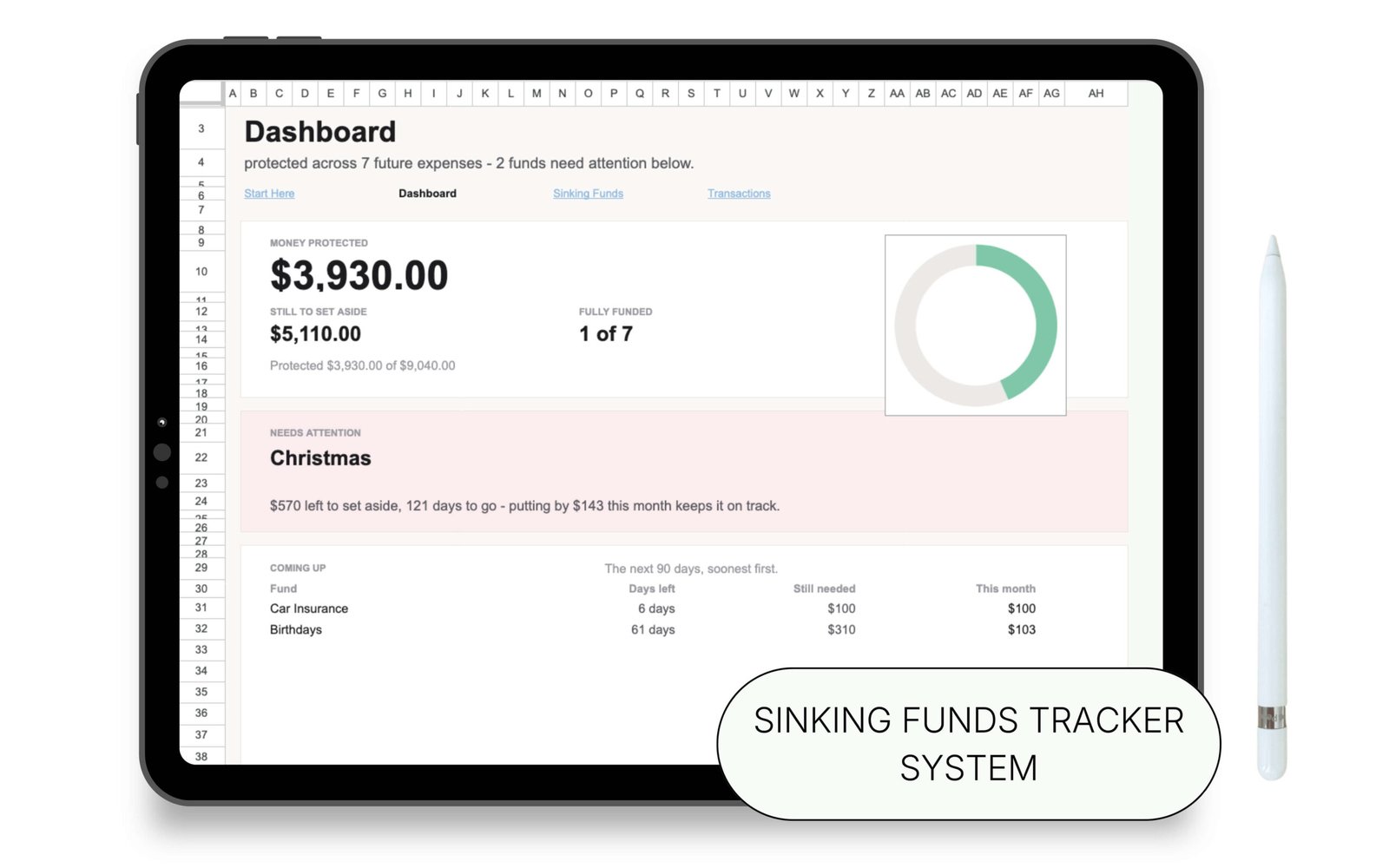
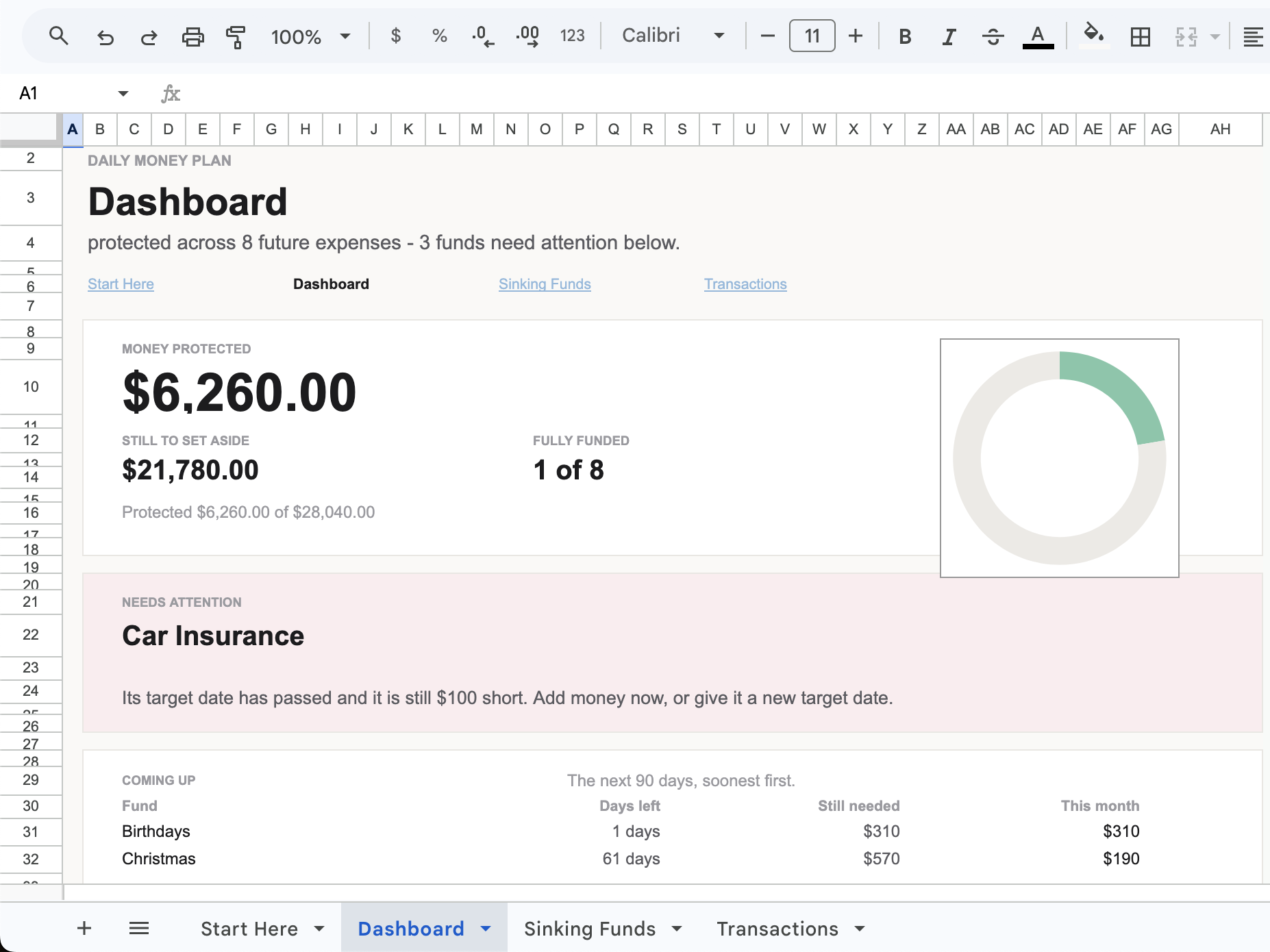
You set a little aside each payday, and the dashboard tells you what’s covered, what’s coming up, and the one fund that needs attention. Nothing is sudden anymore. That’s this one.
The simpler way
Give every future expense a home.
No complicated system. Name what’s coming, set a target, and set money aside a little at a time. The dashboard keeps you covered.
- See what’s protected. One number shows how much you’ve already set aside across every fund. Watch it grow that’s money that can’t ambush you anymore.
- Know what to set aside. Each fund shows the monthly amount to reach its target in time, and a 90-day “coming up” view tells you what needs funding next.
- One fund at a time. The dashboard flags the single fund that needs attention, so you always know where to look — instead of trying to watch all of them at once.
Name it. Fund it. Stay covered.
No formulas to build. No dividing in your head. Just name what’s coming and log what you set aside.
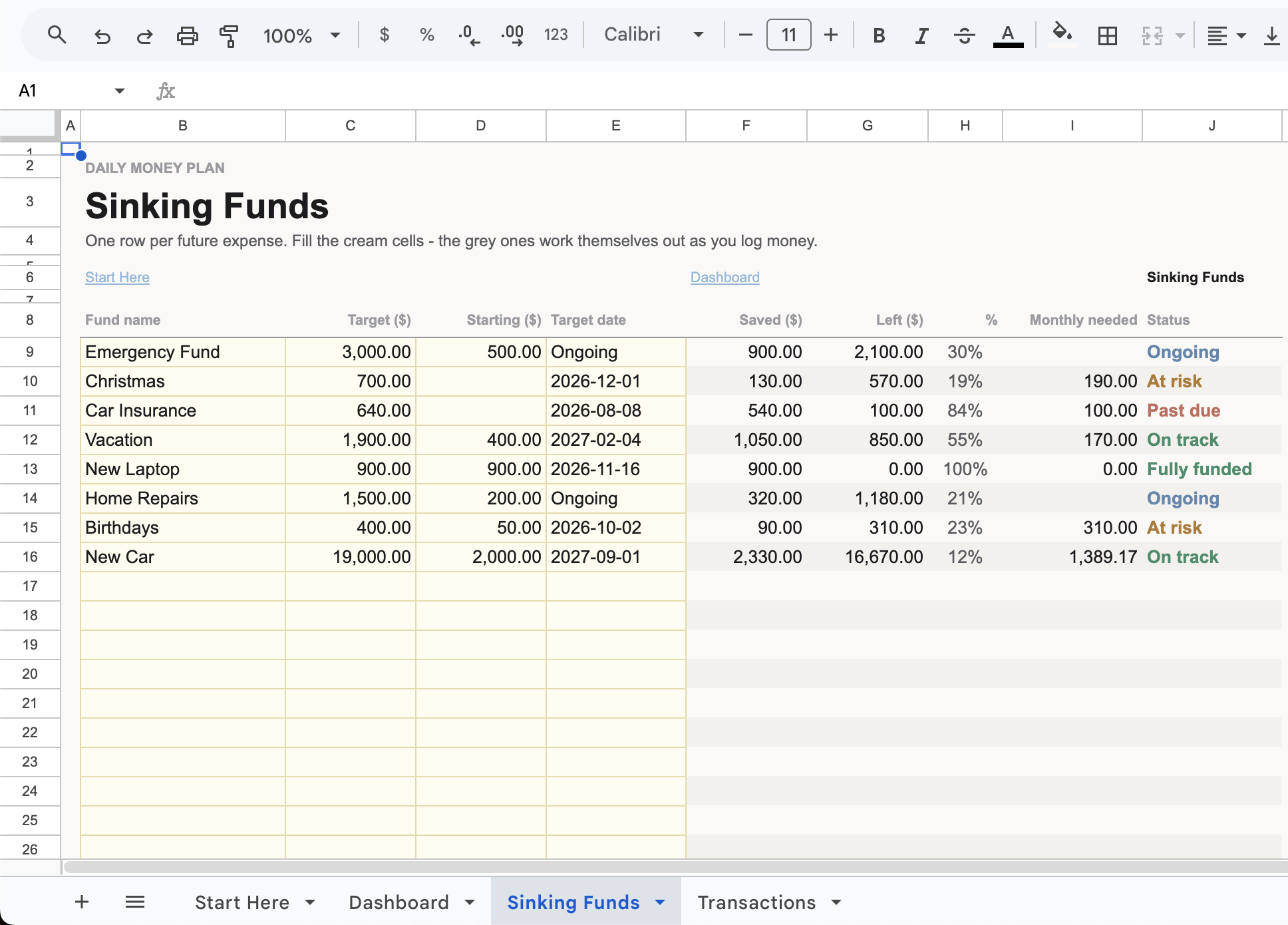
Create your funds
Name each future expense — Christmas, car insurance, an emergency fund and give it a target and a date (or mark it Ongoing). Room for 30.
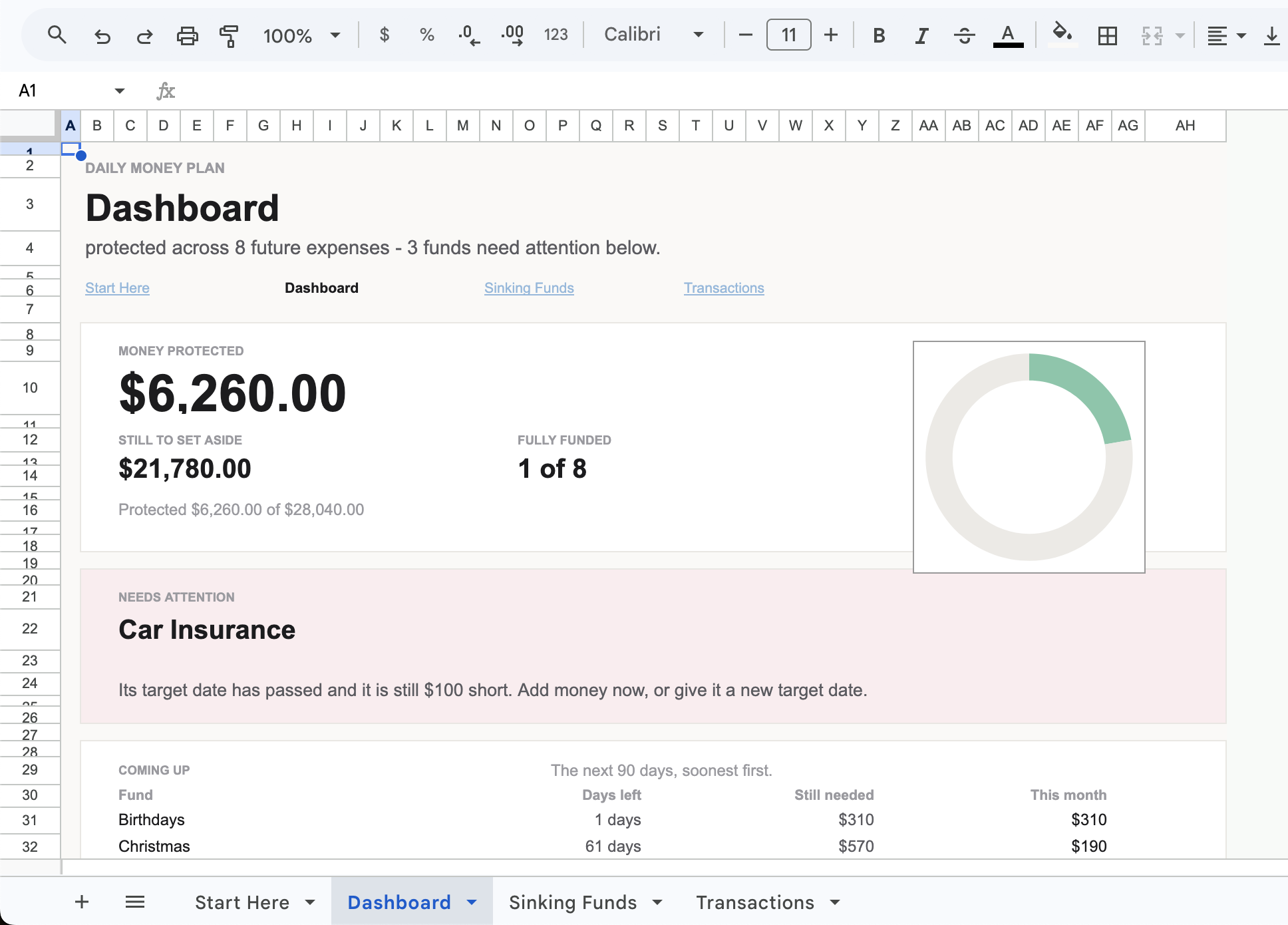
Log money in and out
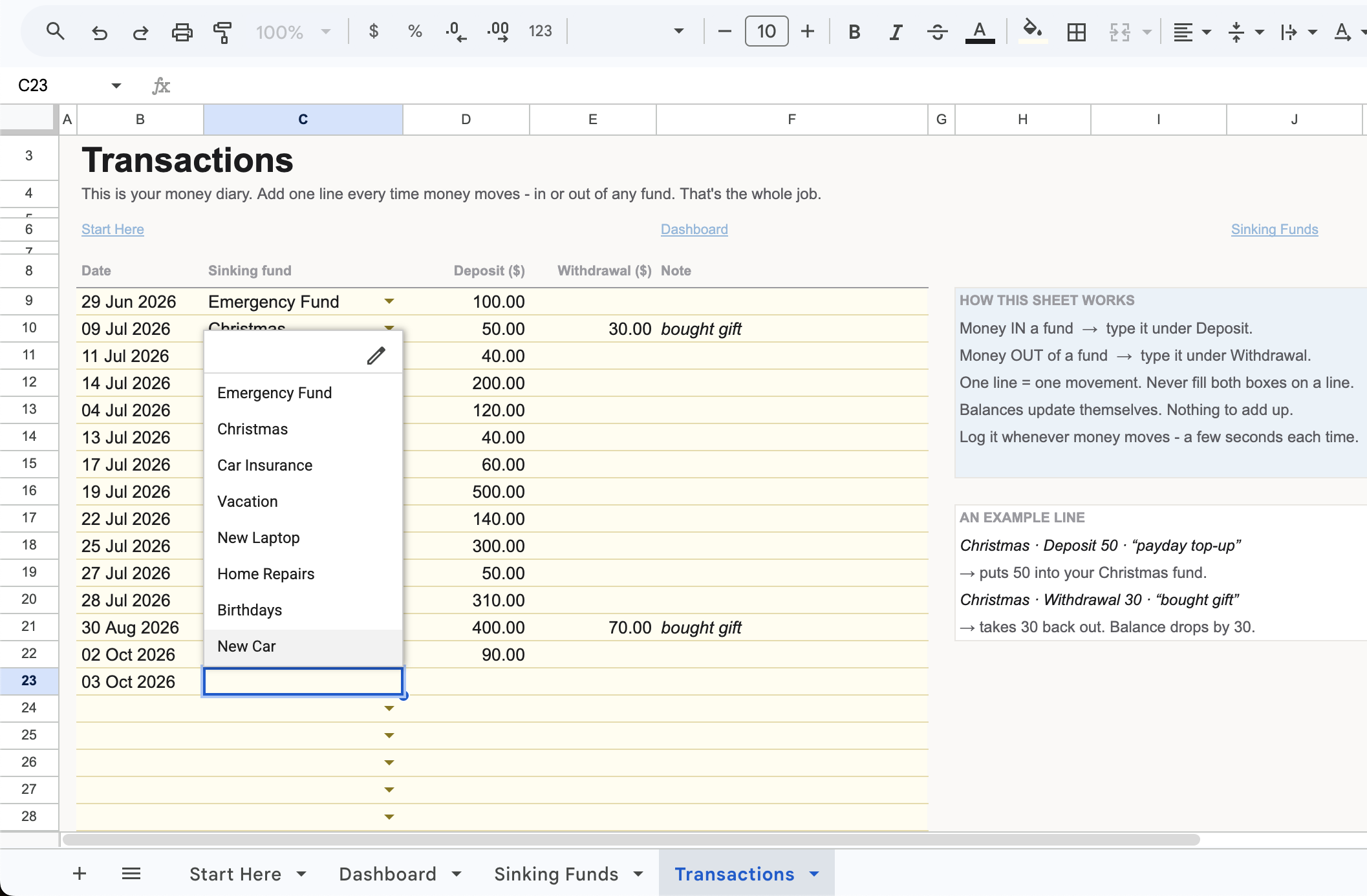
Each time you set money aside or spend from a fund, add a line: date, fund, in or out. The dashboard shows what’s covered.
Everything to stop being caught out.
A done-for-you system that turns “I hope I’ve got enough” into “it’s already handled.”
Money Protected
One number for everything you’ve set aside across all your funds. The bigger it grows, the fewer surprises can reach you.
Monthly needed, per fund
Each fund shows exactly how much to set aside to be ready by its target date. No dividing, no guessing.
The one fund that needs attention
The dashboard names the single fund that’s behind or past due, and what to do about it — so you’re never watching all of them at once.
Coming up in 90 days
A soonest-first view of what’s due, how many days you have, and what to put in this month.
Room for 30 funds
Christmas, car insurance, home repairs, the vet, that annual subscription — plus Ongoing funds like an emergency fund that never really ends.
Clear status on every fund
On track, at risk, past due, or fully funded — so you can see your whole year at a glance.
Google Sheets & Excel
The app you already have. One file, both platforms.
Instant Access
Yours the second you buy.
One-Time Purchase
Pay once. No subscription.
Three steps, then you’re covered.
No complex setup. Name it, fund it, and the dashboard handles the rest.
Create your funds
Name each future expense, set a target and a date (or mark it Ongoing), and add anything you’ve already saved.
Log money in and out
Pick the fund, then enter a deposit or withdrawal. A few seconds, no maths.
Check the dashboard
See what’s protected, what’s coming up, and the one fund that needs you. Come back every payday.
It opens in Sheets or Excel. Nothing new to learn.
No new app. No login to forget. One file that works in both Google Sheets and Microsoft Excel — no macros, nothing to install.
Google Sheets
Prefer your browser? Open it in Google Drive and update your funds from any device, free.
Microsoft Excel
Prefer your desktop? Open the same file in Excel and manage everything offline.
What’s-included strip: Your download comes with the ready-to-use tracker and a fully filled example — so you can see exactly how it works before you touch a thing.
Built for anyone tired of being blindsided.
This is for you if…
- Irregular expenses keep catching you off guard.
- You’ve raided your savings — or used a credit card for a cost you knew was coming.
- You want every future expense to have a home.
- You want to know exactly how much to set aside each month.
- You want to see progress, not just stare at a number.
- You’d rather use Sheets or Excel than another app.
This may not be for you if…
- You want an app that moves money or links to your bank for you.
- You only want to build an emergency fund for true surprises — this is for the planned, irregular costs you can see coming.
- You’re looking for investing or financial advice — this is an organizing tool, not advice.
- You don’t want to use a spreadsheet at all.
Every future expense, already handled.
Give every irregular cost a home — and stop being caught out.
What’s inside:
- The full Sinking Funds Tracker System
- Google Sheets + Excel
- “Money Protected” dashboard + monthly amount per fund
- The one fund that needs attention + a 90-day view
- Room for 30 funds, with Ongoing option
- Start Here guide + filled example
Try it. If it’s not right for you, ask for a full refund within 14 days. No hoops.
No subscription. No hidden fees. Yours to keep.
Get the spreadsheet → 🔒 Secure 256-Bit Encrypted CheckoutA few things you might be wondering.
No. You only type in the cream cells — the fund name, target, and your deposits. Everything else calculates itself.
Money you set aside gradually for a known but irregular expense — like Christmas, car insurance, or a car repair. It's different from an emergency fund: an emergency fund is for true surprises, a sinking fund is for the costs you already know are coming. Most people need both.
The tracker works it out. Give a fund a target and a date, and it shows the monthly amount to get there in time — no dividing in your head.
That's the hardest part, and it's normal. Start with the one or two that most reliably wreck your budget, then add more as you think of them. (The optional Setup Kit has a checklist that walks you through the ones people forget.)
Up to 30. And you can mark a fund Ongoing like an emergency fund — when it never really ends.
No. It's a tool that helps you organize and set aside money for your own future expenses. It isn't financial or investment advice.
Instantly. It's delivered to your email right after checkout.
Ready to stop being caught out?
Everything you need to give every future expense a home — before it lands.
- The full Sinking Funds Tracker System
- Google Sheets + Excel
- Money Protected + monthly amount per fund
- The one fund that needs attention + a 90-day view
- Instant access
Complete Your Order
Instant access, delivered to your email.
Sinking Funds Tracker System
- Google Sheets + Excel
- Instant download
- Lifetime access, no subscription
