
Stop guessing where your money went.
Living paycheck to paycheck isn’t a math problem — it’s a plan you were never given.
Type your numbers in, and see what’s yours to spend, what’s owed to bills, and what’s actually left.
No scrambling before payday. No math in your head.
Just a clear answer, every payday.
- Works in Google Sheets & Excel
- One-time payment (no subscription)
- Instant download
$27 complete system · 14-day money-back guarantee
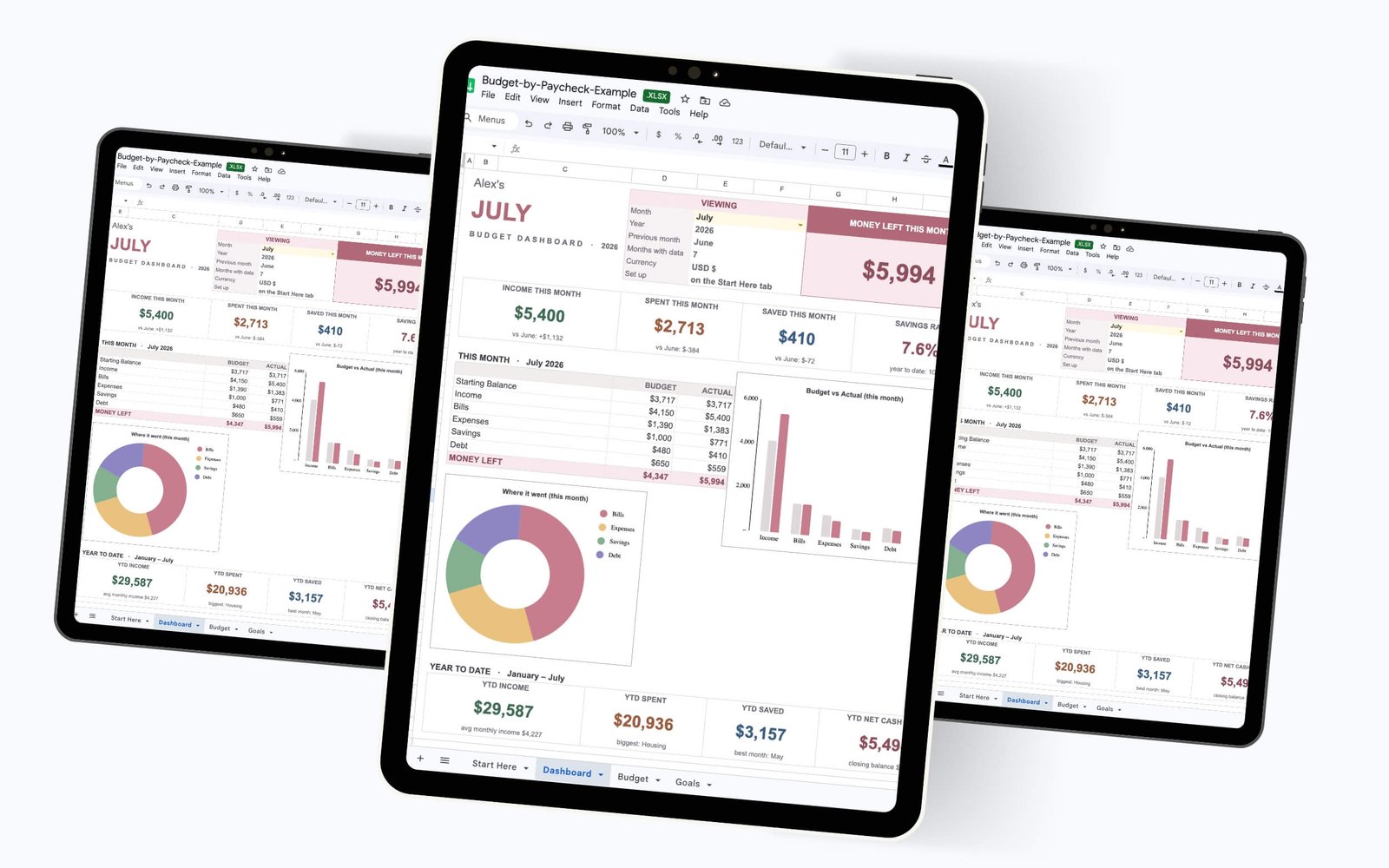
Why standard monthly budgets keep failing you.
If you get paid weekly, bi-weekly, or on an irregular schedule, trying to force your money into a generic 30-day template is like fitting a square peg into a round hole.
The Math Doesn’t Line Up
Standard templates assume you get paid all at once. They don’t help you figure out exactly which paycheck covers which bill before the due date.
DIY Formula Frustration
Building your own spreadsheet from scratch takes hours. You spend more time troubleshooting broken formulas than actually managing your money.
The Disappearing Money
You make good money, but without a plan for each specific paycheck, you always end up scrambling and wondering where it all went by next payday.
Imagine if your budget actually matched your reality.
Instead of fighting against rigid templates, you need a system that maps every dollar exactly as it hits your bank account. Total clarity on what’s due, what’s paid, and what’s left over—every single payday.
The simpler way
Budget the way you actually get paid.
Instead of one monthly total, this workbook works paycheck by paycheck across all twelve months, in a single file. Type your paychecks and bills, and your dashboard shows what’s left. No blank grid to build. No starting over each month.
- Built around your paychecks. Enter each paycheck and any other income, then budget against what you’re actually paid.
- One workbook, all year. Every month lives side by side. Start any month — your history builds itself, and you never duplicate a tab.
- It does the math for you. Type your numbers and your Money Left, category totals, and year-to-date update on their own.
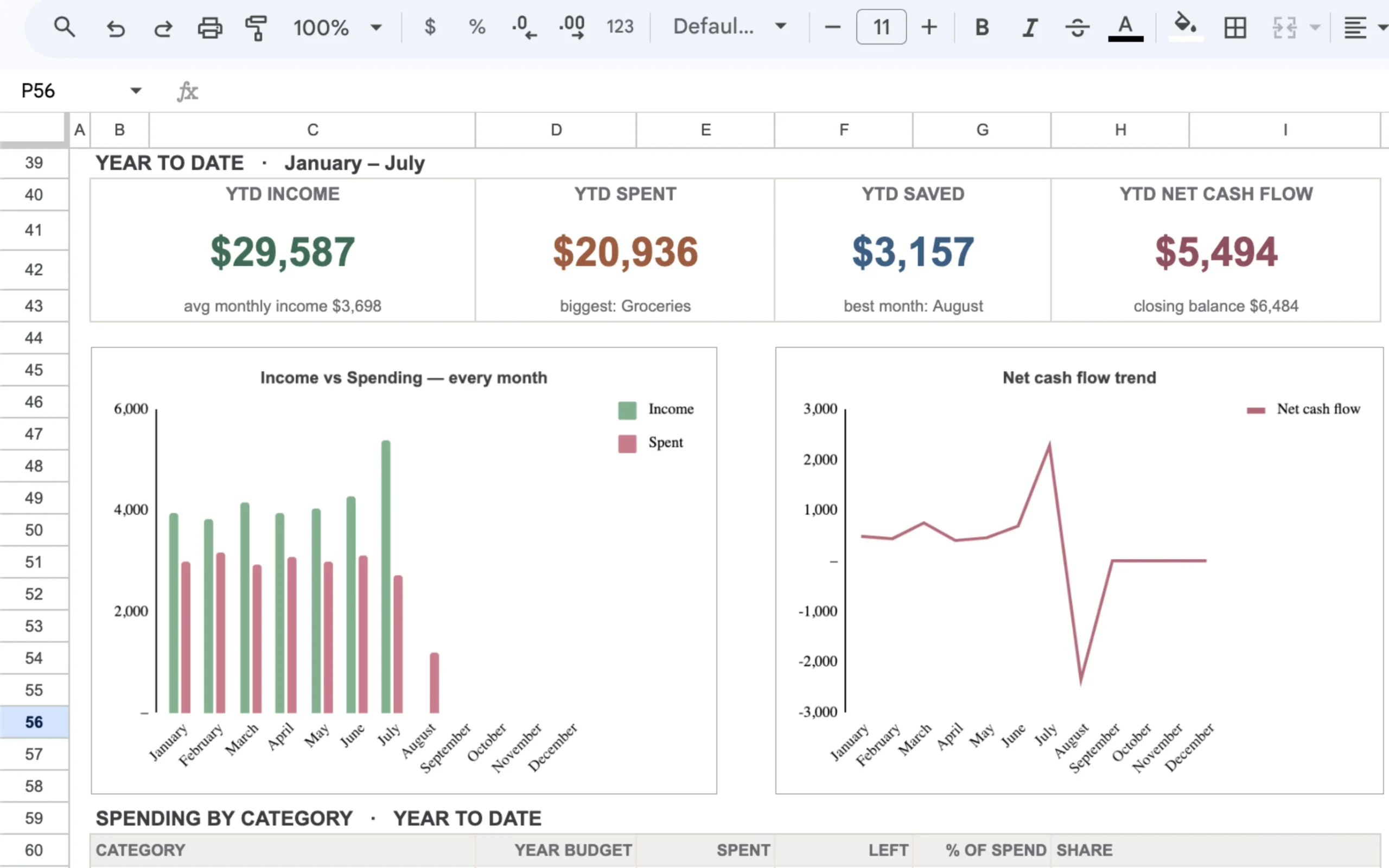
Type your numbers. See your Money Left.
No complex math. No manual calculations. Just enter what you expect to make and what you need to pay, and the dashboard instantly shows exactly what’s left over.
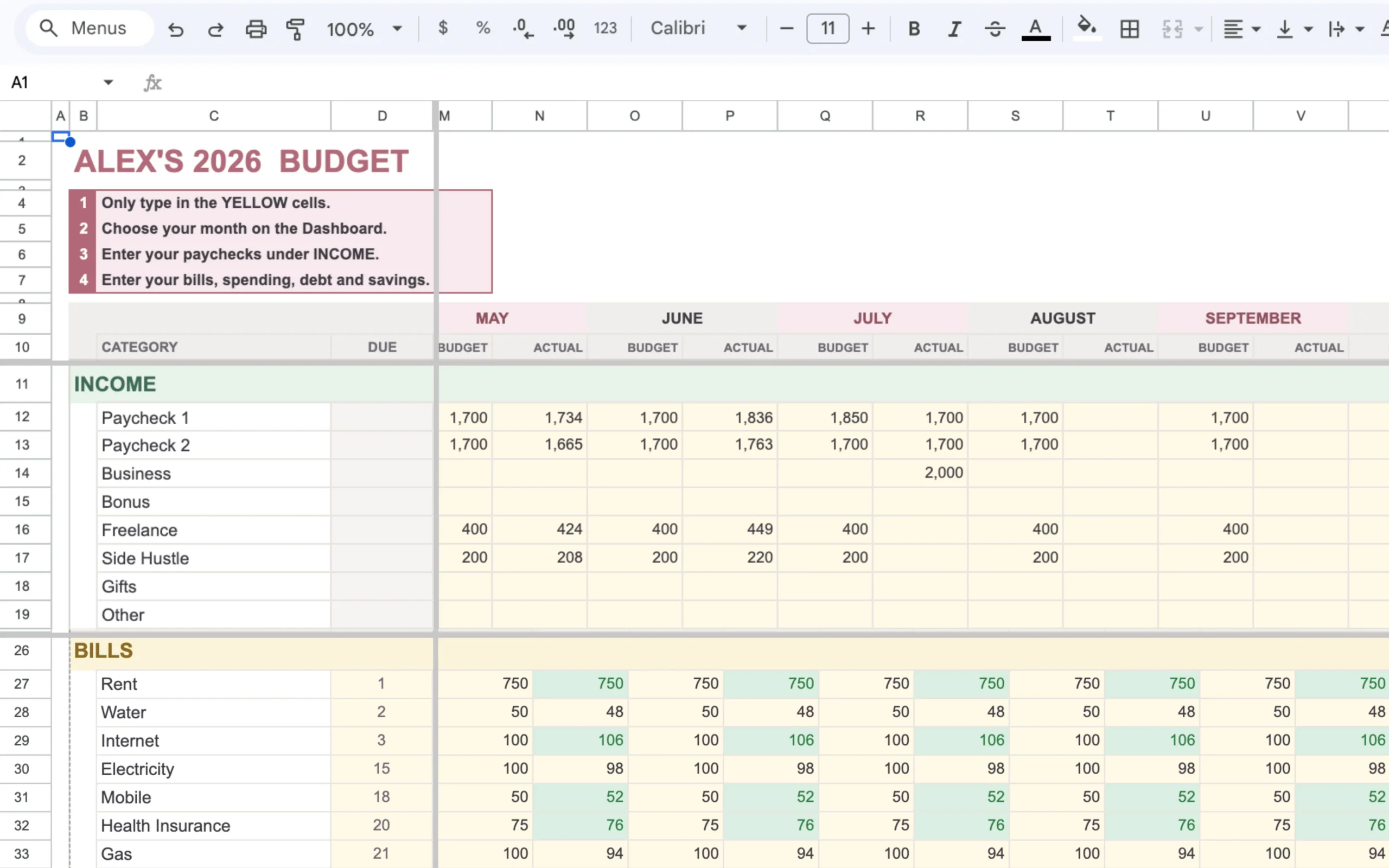
Enter your income & bills
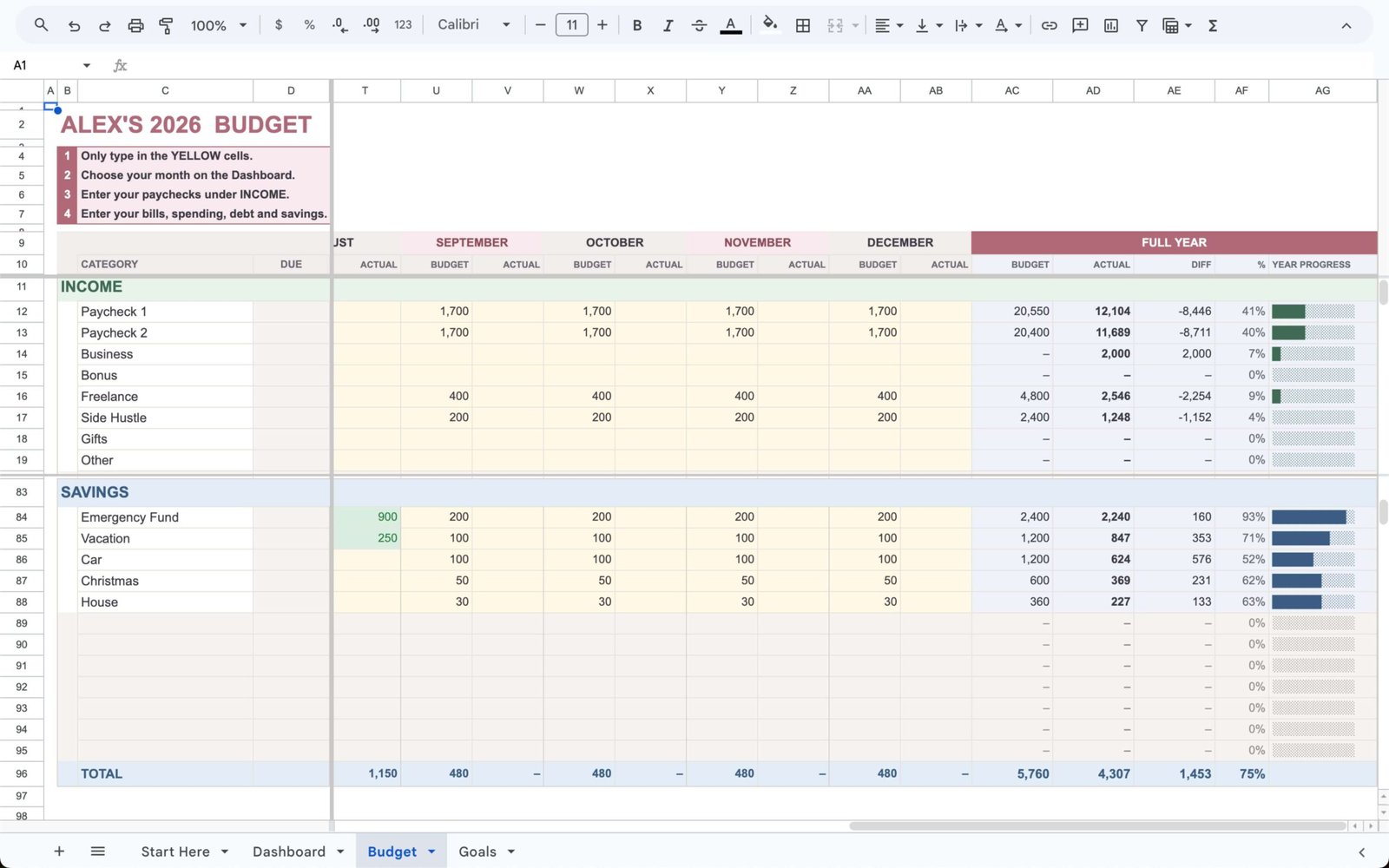
Simply type your planned paychecks and expected expenses into the Budget tab. The spreadsheet is pre-formatted and ready for your numbers.
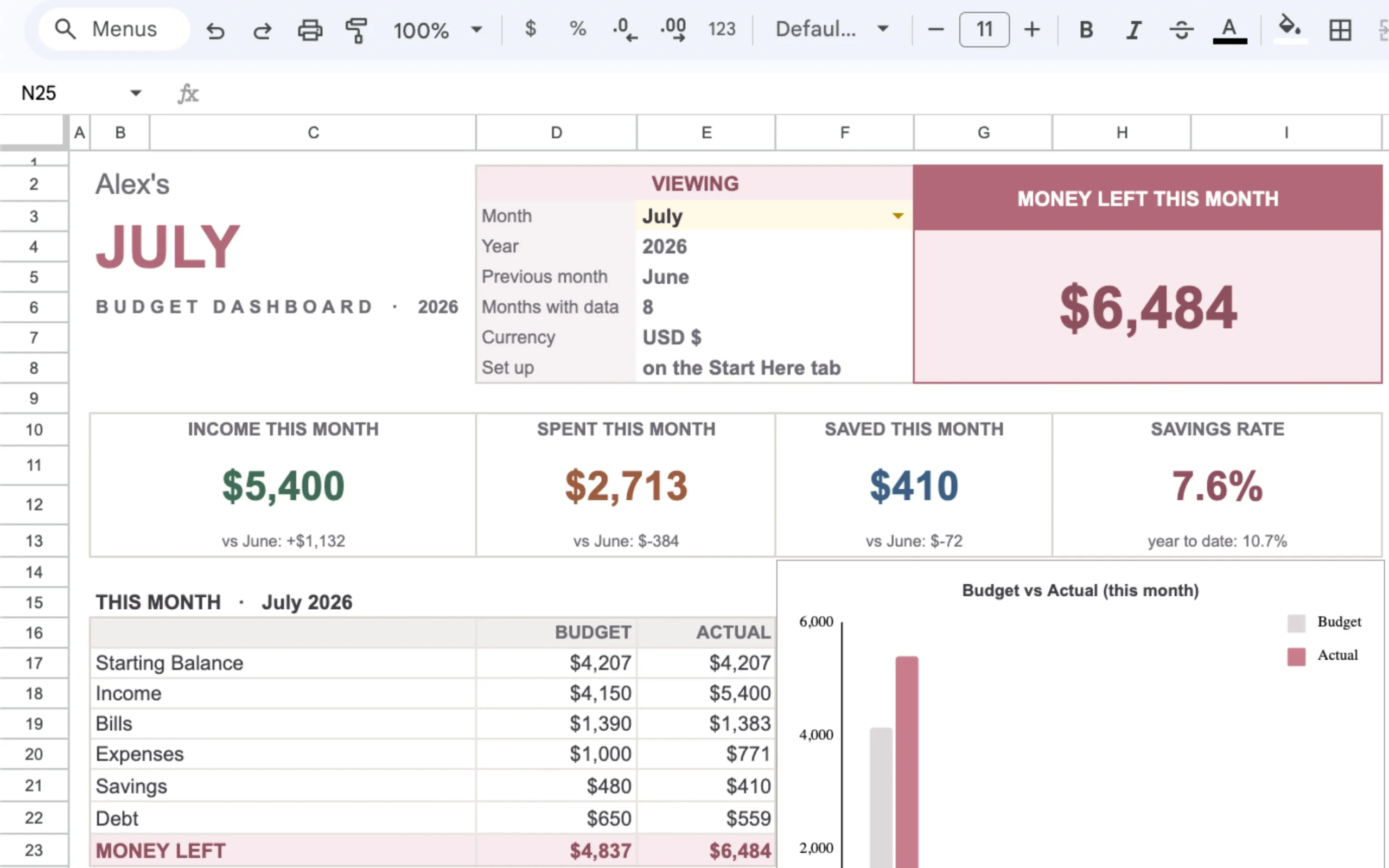
Instantly see your Money Left
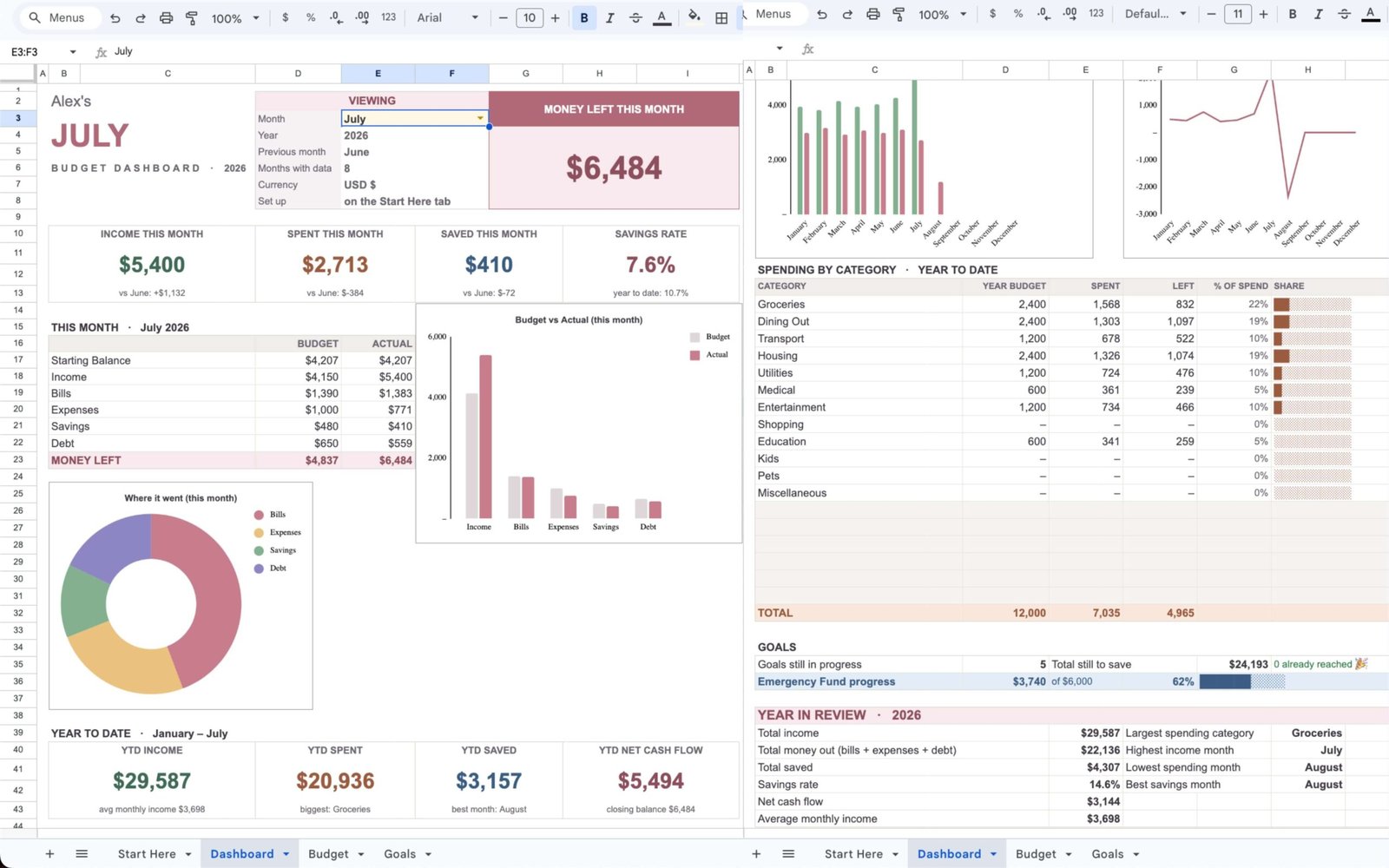
The Dashboard automatically updates based on your inputs, giving you a crystal-clear view of exactly how much is left to spend or save.
Everything you need to plan your money in one place.
A complete, done-for-you spreadsheet system that removes the guesswork from budgeting.
The Dashboard
See exactly where you stand at a glance. Your income, spending, savings, and year-to-date overview are automatically calculated, so you always know your Money Left without doing the math.
The Budget Tab
Organize your income, bills, spending, and savings in one clear view. Plan your monthly expenses alongside your income, giving you an accurate picture of how your money flows each month.
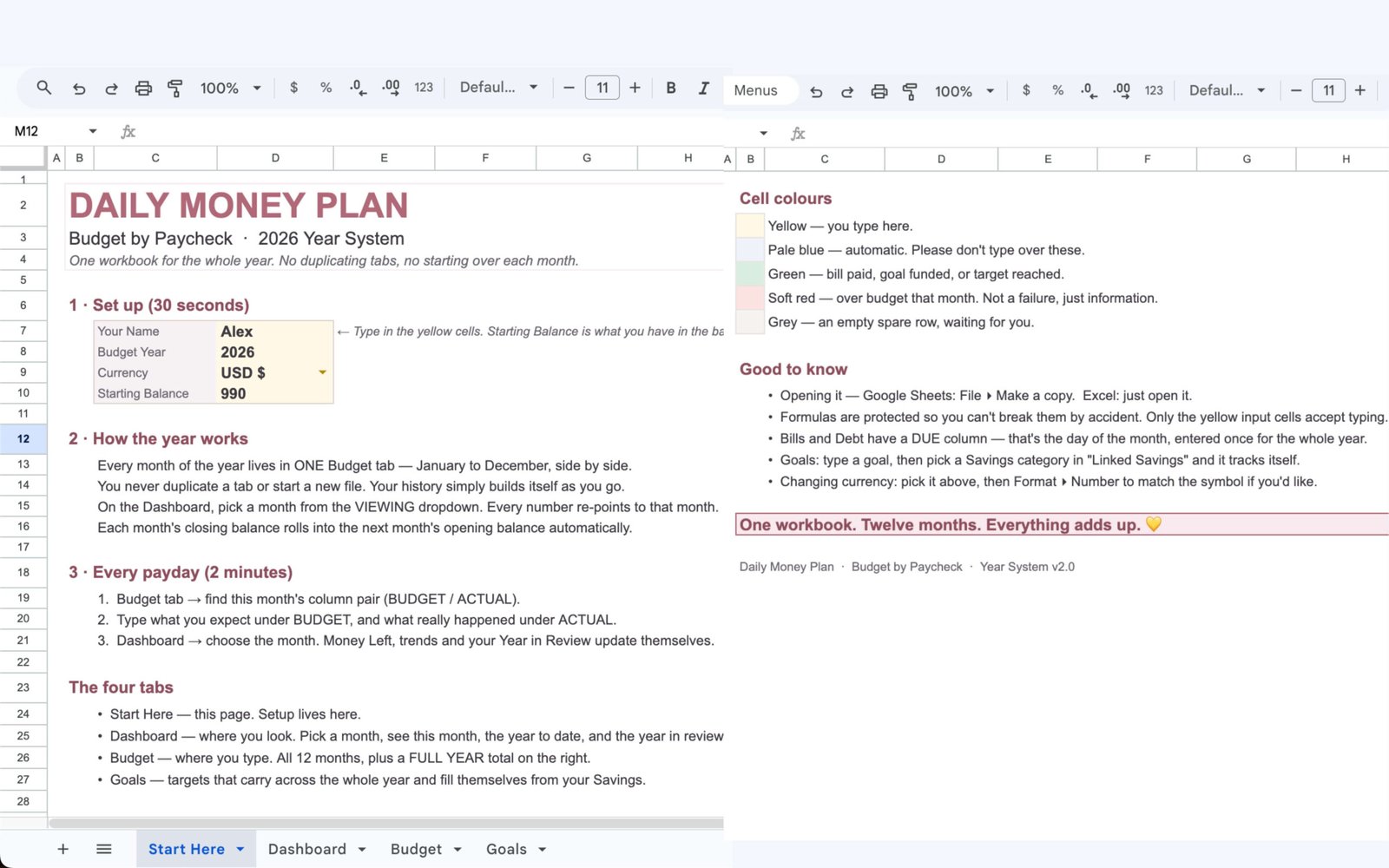
“Start Here” Guidance
Built-in, step-by-step instructions ensure you know exactly where to begin. The included color-coding and key instructions mean you can set up your budget quickly without breaking any formulas.
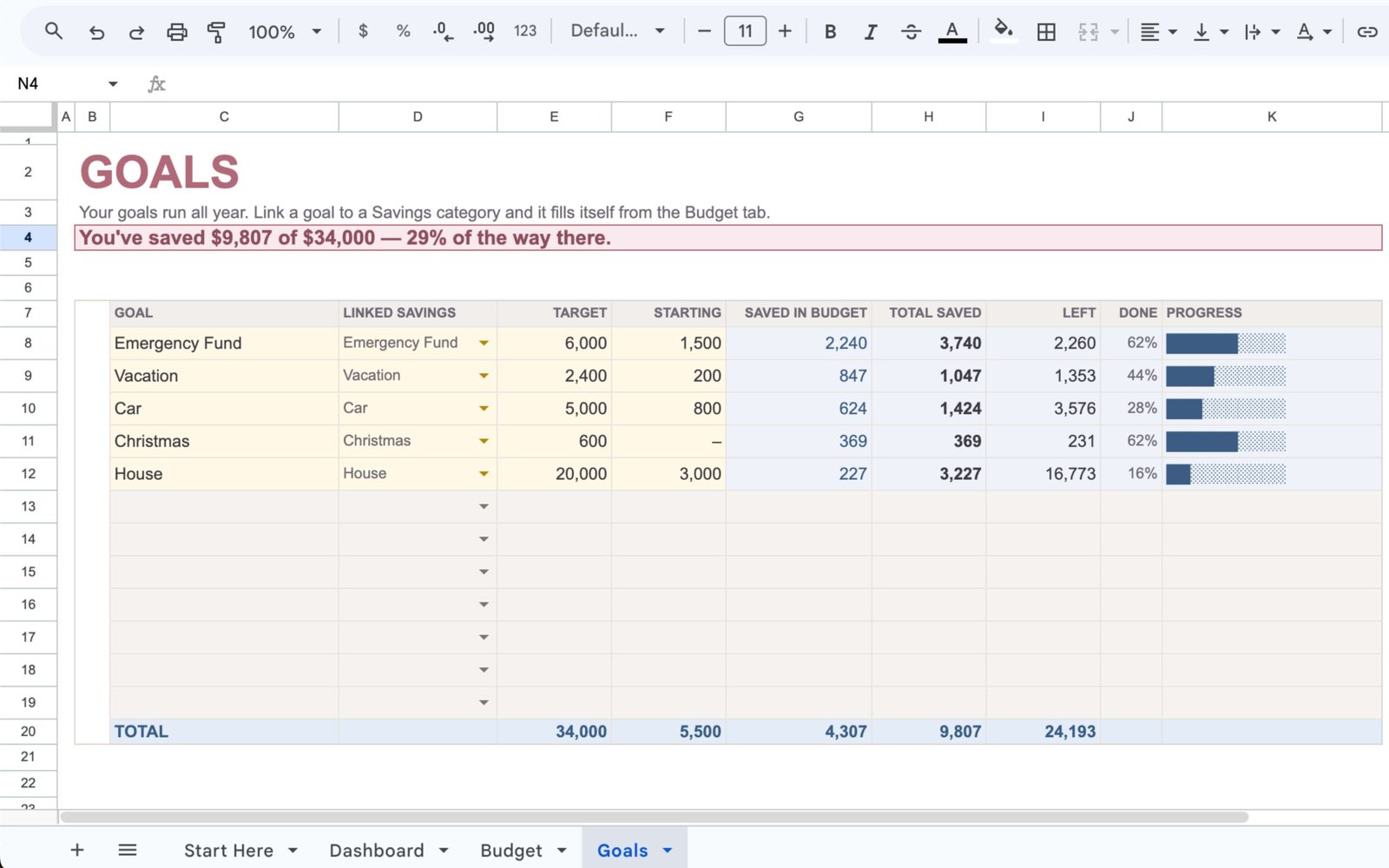
Savings Goals
Track your progress toward your most important financial milestones. Watch your savings grow as you update your budget, keeping you motivated all year long.
Google Sheets & Excel
Use the platform you already know. One file works seamlessly in both Google Sheets and Microsoft Excel.
Instant Access
Get instant access to your files after purchase and start organizing your finances right away.
One-Time Purchase
Pay once for the system and use it year after year. There are no recurring fees or monthly subscriptions required.
Up and running in three simple steps.
No complex setup, no blank templates to build from scratch, and no steep learning curve. Here is how you take control of your money from day one.
Enter your paychecks & income
Type your pay schedule, expected amounts, and any additional income streams into the Budget tab. The workbook organizes everything around your actual pay schedule.
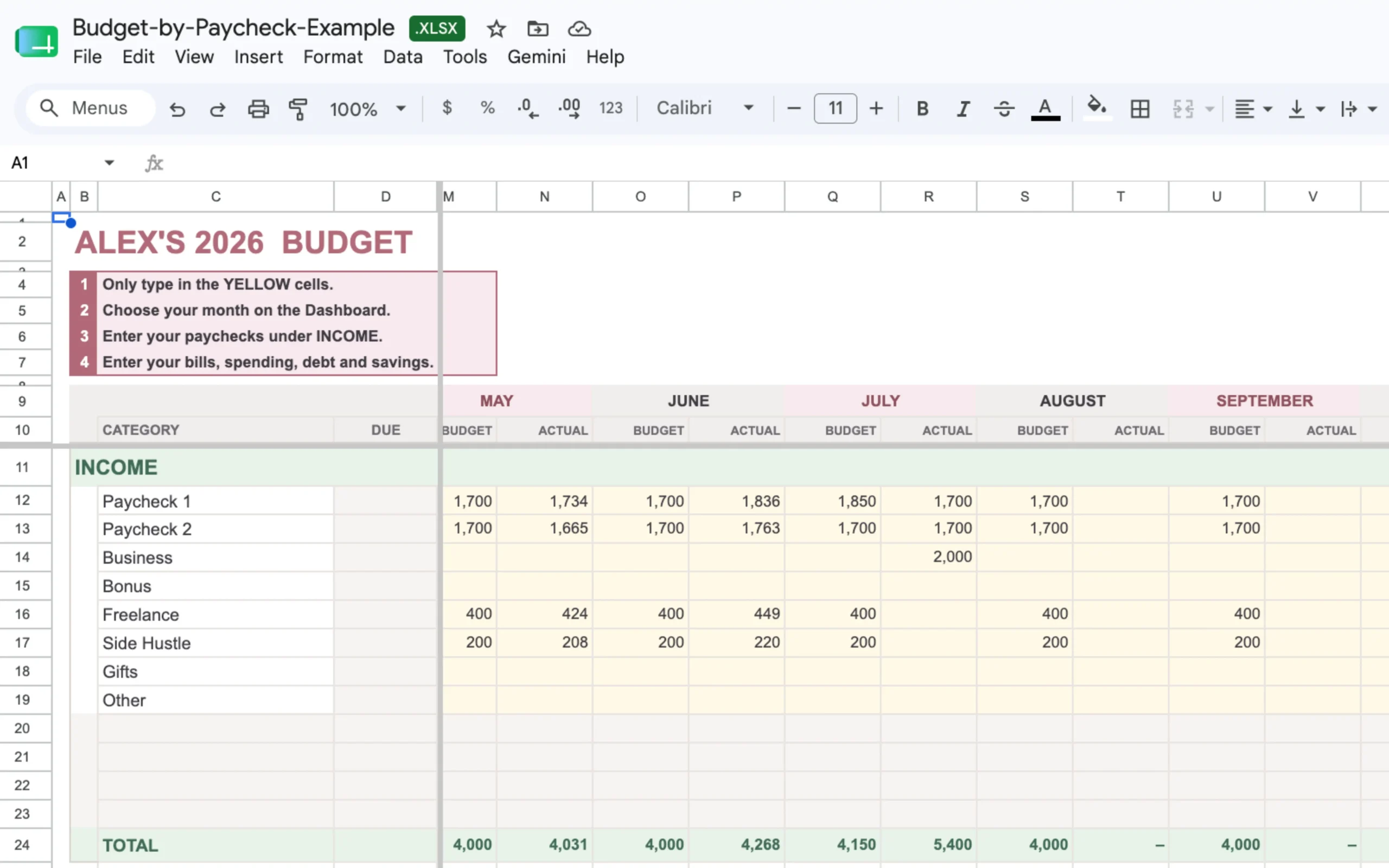
Map your bills & spending
List out your fixed expenses, variable spending, and savings goals. Everything is neatly organized by category across all twelve months in a single file.
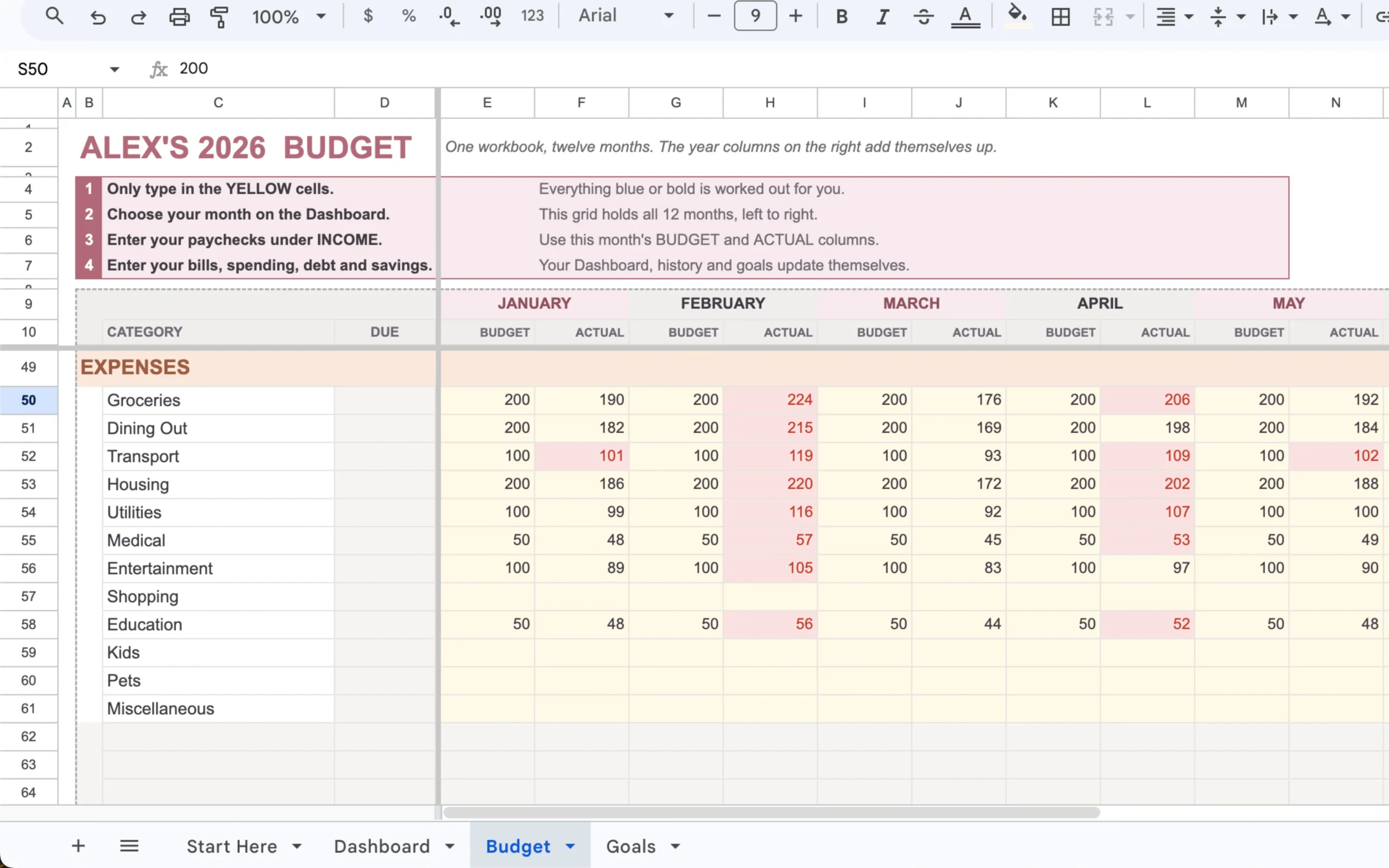
See your Money Left instantly
Watch the built-in formulas do the heavy lifting. Your dashboard updates automatically, showing exactly what’s left over so you can make spending and saving decisions with clarity.
Use the spreadsheet platform you already know.
No new budgeting apps to learn. You get a single, universal workbook that functions flawlessly in both Google Sheets and Microsoft Excel.
Google Sheets
Prefer working in your browser? Simply open your file in Google Drive to track your budget online from any device, totally free.
Microsoft Excel
Prefer working on your desktop? Open the exact same file in Excel to manage your numbers safely in a familiar environment.
What’s included: Your download comes with the blank, ready-to-use template, plus a fully filled demo file so you can see exactly how it works before you start typing.
Built for the way you actually get paid.
If your money comes in by paycheck, your budget should be built around those paychecks too.
This is for you if…
- You get paid weekly, biweekly, or on another regular paycheck schedule.
- You want to know which paycheck needs to cover which bills and expenses.
- You want one system that lets you plan across the entire year.
- You want your numbers and Money Left to update automatically instead of doing the math yourself.
- You prefer Google Sheets or Excel over another budgeting app.
- You want a ready-to-use spreadsheet instead of spending hours building one from scratch.
This may not be for you if…
- You want a full-service budgeting app that automatically connects to your bank accounts.
- You want someone else to manage your finances for you.
- You are looking for investment, tax, or professional financial advice.
- You don’t want to use a spreadsheet at all.
A simpler way to take control of every paycheck.
Get the complete Budget by Paycheck System and start organizing your income, bills, spending, and savings around the way you actually get paid.
What’s Included Inside:
- Complete spreadsheet system
- Google Sheets + Excel
- Dashboard + Budget Tab
- Start Here guidance + Savings Goals
- Automatic calculations
- Instant digital access (One-time purchase)
Try it out. If it isn’t right for your budget, request a full refund within 14 days.
No monthly subscriptions or hidden fees. Yours to keep forever.
Get the Spreadsheet → 🔒 Secure 256-Bit Encrypted CheckoutA few things you might be wondering.
Straight answers before you decide.
No. You fill in the intended input cells, while the workbook handles the calculations. The “Start Here” tab provides simple setup guidance to help you get started.
Works with both Google Sheets and Excel. Choose whichever platform you prefer. Google Sheets requires a free Google account.
Yes — open it in the Google Sheets app to check your budget and log spending on the go. For the initial setup, a computer is a little easier, but it’s not required.
Yes. The system is designed around paycheck-based income and supports common schedules such as weekly, biweekly, and semi-monthly pay.
Yes. You can start with the month you’re currently budgeting for and leave earlier months empty.
No. It is a $27 one-time purchase. There are no recurring monthly subscription fees for the spreadsheet system.
You’ll get access to your files after checkout, and a copy will also be sent to your email.
Ready to take control of your paychecks?
Everything you need to start budgeting by paycheck is included.
- Complete Budget by Paycheck System
- Google Sheets + Microsoft Excel
- Dashboard + Budget Tab
- Start Here guidance + Savings Goals
- Instant digital access
Complete Your Order
Get instant access delivered to your email after purchase.
Budget by Paycheck System
- Google Sheets + Excel formats
- Instant digital download
- Lifetime access, no subscription
